
Identify users at registration (Cordova)
The account-registered signal is how your Cordova app tells Connect that a new user just signed up. The SDK sends an identifier — typically a customer ID or email address — and Connect uses it to create the contact record or match it to an existing one. Once the contact is known, marketers can trigger onboarding journeys, and the rest of the user's session is attributed to that contact. For details on how Connect processes identification records, see How behavior signals are processed in Connect.
Language: JavaScript, with TypeScript definitions
Platforms: iOS and Android — the steps below apply to both. See Platform parity for details.
Availability: Pro, Premium, and Ultimate
How identification works
Two parameters do the identification work:
identifierName— the contact attribute in Connect that the value should be matched against (for example,Customer IDorEmail Address).identifierValue— the value itself.
signalType tells the backend which signal to record — pass 'accountRegistered' explicitly to record this as an Account Registered event. Unlike sign-in, this signal type is never the default; if you omit signalType, the SDK sends 'loggedIn' instead, which is the wrong signal for a registration moment.
Choosing an identifier
Use the most stable identifier your account-creation service returns:
- Customer ID (preferred when available) — matches your Connect audience's contact key attribute.
- Email address or phone number — well-suited for identification when no customer ID is available yet.
Populate multiple attributes at registration
logIdentity() populates one contact attribute per call. To set more than one, call it once per attribute, back-to-back, immediately after the account is created:
await AcousticConnect.logIdentity('Email Address', user.email, 'accountRegistered', {
  registrationMethod: 'email',
});
await AcousticConnect.logIdentity('First Name', user.firstName, 'accountRegistered', {
  registrationMethod: 'email',
});
Use this pattern only for the registration moment itself, when the calls fire back-to-back in the same authenticated context.
Implementation considerations
Registration timing
The account-registered signal must fire after the account is created — not when the user submits the sign-up form. For flows involving email verification or an external identity provider, it can't fire until the account is confirmed server-side.
Wire format
Pass every signal field as a top-level key in additionalParameters. The object is flat; don't nest values.
Contact mapping
identifierName must match a contact attribute name exactly as it appears in Connect, including capitalization and spacing. Look up attribute names in Connect under Audience > Contacts > Attributes.
Platform parity
logIdentity() is a single bridge method. On iOS it dispatches to logIdentificationEvent, which calls ConnectSDK.shared.identity.log(...) then ConnectSDK.shared.flush(). On Android it calls Connect.logIdentificationEvent(...) then Tealeaf.flushAll(false). Both platforms flush immediately so Connect sees the signal without waiting for the next scheduled batch upload.
Configuration
Method
AcousticConnect.logIdentity(
  identifierName,        // string, required
  identifierValue,        // string, required
  signalType,             // string, optional — pass 'accountRegistered' explicitly
  additionalParameters    // Record<string, string>, required — must include registrationMethod
);
// returns Promise<void>
Parameters
| Parameter | Type | Required | Description |
|---|---|---|---|
identifierName | string | Yes | The contact attribute name this identifier maps to. Case-sensitive. |
identifierValue | string | Yes | The value of the identifier. |
signalType | string | Yes | Pass 'accountRegistered'. If omitted, the SDK defaults to 'loggedIn' — the wrong signal for a registration event. |
additionalParameters | Record<string, string> | Yes | Signal fields as top-level keys. See Supported fields. |
Return value. Promise<void>. The promise rejects with { code, message } if identifierName or identifierValue is empty after trimming, or if the SDK isn't enabled yet.
Supported fields in additionalParameters
Required
registrationMethod— any string identifying the registration method, for example'email','passwordless', or'sso'. The backend requires this field and ignores the signal without it.
Optional
registrationSource— where the registration originated.
Examples
Basic example
await AcousticConnect.logIdentity(
  'Email Address',
  user.email,
  'accountRegistered',
  { registrationMethod: 'email' }
);
Complete implementation example
async function handleRegistration(email, password, firstName) {
  try {
    const user = await accountService.signUp({ email, password, firstName });

    await AcousticConnect.logIdentity(
      'Email Address',
      user.email,
      'accountRegistered',
      { registrationMethod: 'email', registrationSource: 'Cordova app' }
    );

    navigateToOnboarding();
  } catch (error) {
    console.error('logIdentity failed:', error);
  }
}
Verify the signal
In the log
Filter the Xcode console by EOCore and look for these entries after registration:
| Entry | What it means |
|---|---|
JSONOut: ... "signalType":"accountRegistered" ... | Signal included in outgoing payload |
Status Code: 200 | Collector confirmed receipt |
Filter Logcat by EOCore and look for these entries after registration:
| Entry | What it means |
|---|---|
Added to queue: ... "signalType":"accountRegistered" ... "Email Address":"..." | First signal queued — email attribute |
Added to queue: ... "signalType":"accountRegistered" ... "First Name":"..." | Second signal queued — name attribute |
PostTask message sent to the target server successfully | Signals flushed to collector |
Http status: 200 from url: ... | Collector confirmed receipt |
In Connect
Three options:
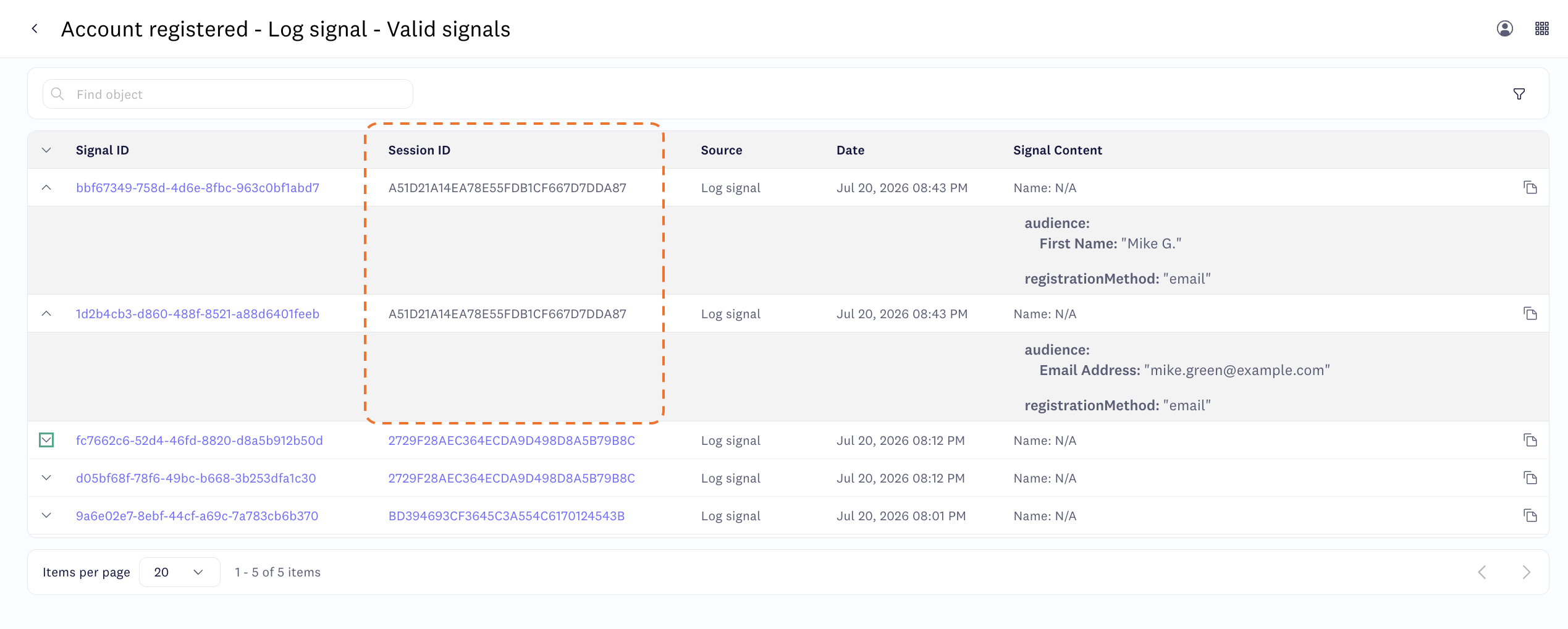
- Behavior studio > Signal management — select the Account registered signal type and find your signals in the list. If you populated several attributes, one entry appears per attribute, all sharing the same session ID. Entries are clickable — open one to inspect its content. If the signal is formatted incorrectly, an error message appears.
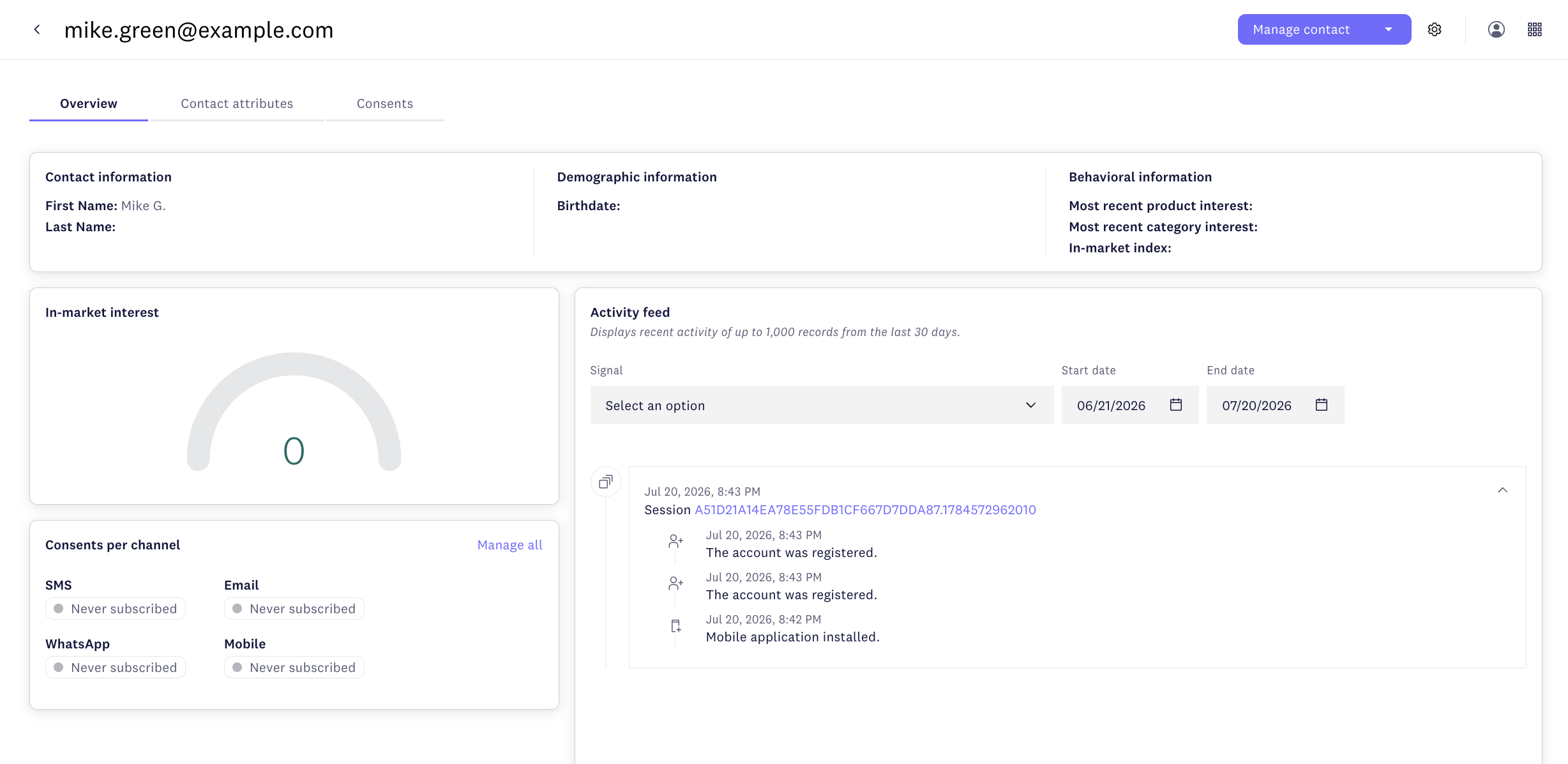
- Audience > Contacts — search for the email address or customer ID you used. A new contact will be created if one didn't exist. Open the contact and check its activity feed for the signal.
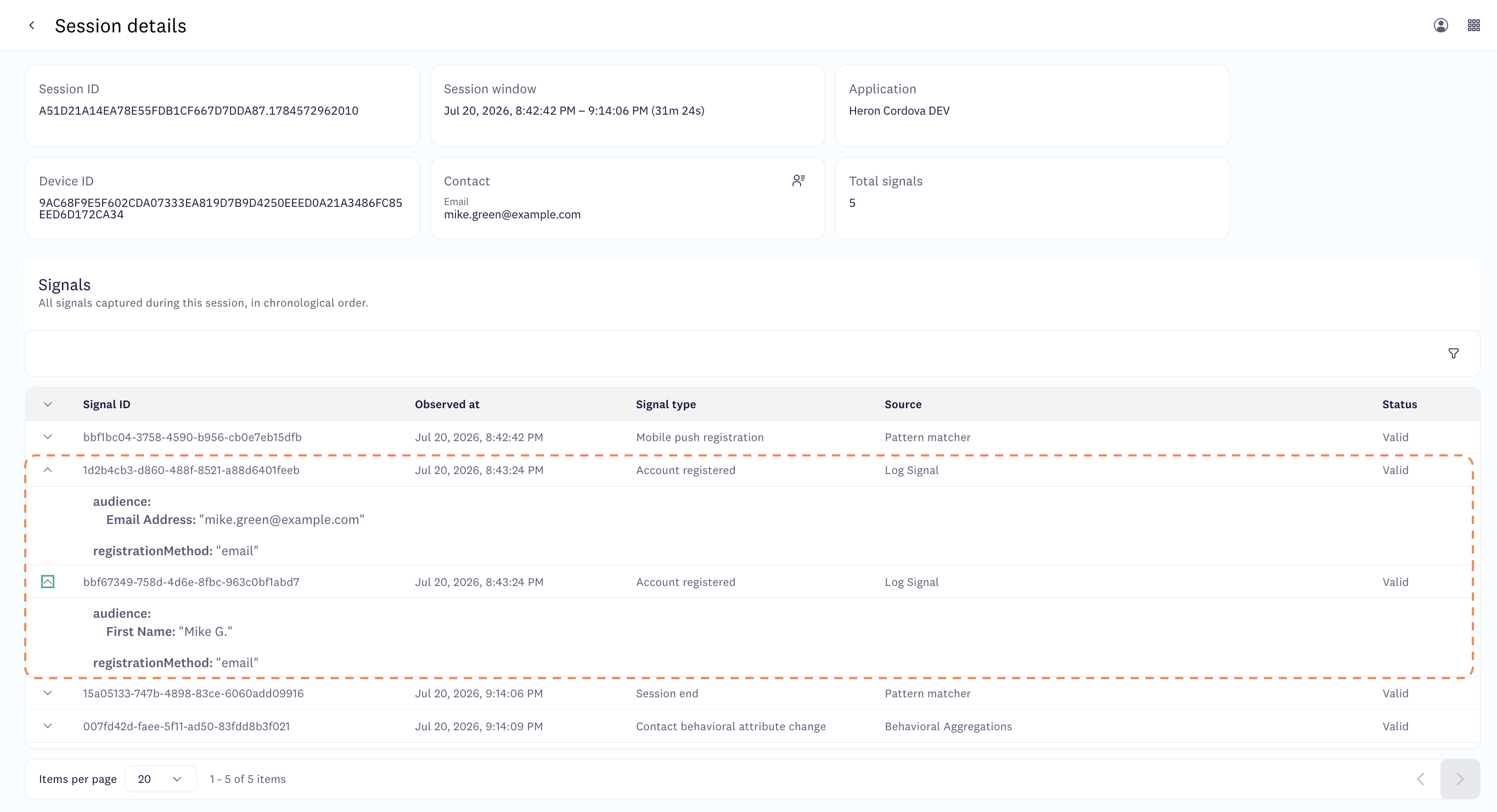
- Behavior studio > Session intelligence (Premium and Ultimate) — find your session and inspect all signals recorded in it.
Troubleshooting
Signal not appearing in Connect?
- Verify
identifierNameandidentifierValueare not empty or whitespace-only. - Confirm you passed
'accountRegistered'assignalType— if omitted, the SDK sends'loggedIn'instead. - Confirm you called
AcousticConnect.enable()first and awaited it before callinglogIdentity(). - Check the log entries in Verify the signal above — if the signal appears in the log but not in Connect, the issue is likely a collector mismatch or
identifierNamecase error.
Contact not created or updated?
- Verify
identifierNamematches a contact attribute defined in Connect exactly, including capitalization and spacing. - All values in
additionalParametersmust be strings.
Updated 4 months ago