
Integrate the Connect SDK into a Cordova app
You can integrate the Connect SDK into your Cordova app and get it running on iOS and Android through one JavaScript API.
Language: JavaScript (vanilla · framework-bundled), with TypeScript definitions
Availability: Pro, Premium, and Ultimate
Scope: This guide covers installing the plugin and getting the SDK running for development and testing. For push notification setup, see iOS and Android.
Requirements
- Acoustic Connect subscription. Register your app in Connect and get an app key and collector URL. See Connect mobile apps.
- Development environment. Node.js 20 or later, Cordova CLI 12.0.0 or later (
npm install -g cordova). - iOS: cordova-ios 7.0.0 or later, Xcode 15 or later, and CocoaPods (
sudo gem install cocoapods). iOS deployment target 15.1 or later. - Android: cordova-android 13.0.0 or later, Android Studio with SDK 34 or later, JDK 17. Recent Android Studio releases (Giraffe and later) ship the Gradle IntelliJ plugin only — install a standalone
gradlebinary and make sure it's onPATH, orcordova-androidcannot bootstrap the project's Gradle wrapper.
Initial setup
- Add the plugin to your Cordova project. Run from your Cordova project root — the directory containing
config.xml. This registers the plugin under the Cordova plugin IDco.acoustic.connect.pushand addswindow.AcousticConnectto your app's JavaScript context.
npx cordova plugin add cordova-acoustic-connectnpx cordova plugin add [email protected]- Create ConnectConfig.json at your Cordova project root. Add your Connect credentials to the file.
{
  "Connect": {
    "AppKey": "<your-app-key>",
    "PostMessageUrl": "<your-collector-url>",
    "useRelease": false
  }
}
ConnectConfig.json field reference
| Field | Description |
|---|---|
AppKey | Required. Your Connect application key. |
PostMessageUrl | Required. Your Connect collector endpoint. |
useRelease | false (default) installs the AcousticConnectDebug pod with verbose logging. true installs the AcousticConnect release pod. Must be a boolean ( npx cordova prepare fails otherwise). Changing this value requires removing and re-adding the plugin because a plain cordova prepare won't pick it up. See Move your Cordova integration to production. |
-
Add ConnectConfig.json to
.gitignoreto keep your credentials safe. -
Run
npx cordova prepare. On iOS, this runspod install— no need to do it yourself, unless CocoaPods reports a stale spec repo (see Troubleshooting).
npx cordova prepare
WarningOn iOS, this step runs
pod install, which generates a.xcworkspacefile. From this point on, always openplatforms/ios/App.xcworkspace— not.xcodeproj. Opening the.xcodeprojdirectly causes build failures because CocoaPods dependencies are only linked through the workspace.
- Add
connect-config.jsto index.html, aftercordova.js.npx cordova preparegenerates this file from ConnectConfig.json and exposeswindow.ConnectBasicConfig— reference it before your app's script:
  <script src="cordova.js"></script>
  <script src="js/connect-config.js"></script>
  <script src="js/index.js"></script>
Edit the root index.html — the Vite template, not www/index.html. Add connect-config.js after cordova.js:
<script src="cordova.js"></script>
<script src="js/connect-config.js"></script>- Call
AcousticConnect.enable()from yourdevicereadyhandler, before any other plugin method. Pass your credentials fromwindow.ConnectBasicConfigso they stay defined in one place — ConnectConfig.json.
// At the top of www/js/index.js:
const CONFIG = window.ConnectBasicConfig || {};

// Enables the SDK from the bundled config.
document.addEventListener('deviceready', async function () {
  await AcousticConnect.enable(CONFIG.AppKey, CONFIG.PostMessageUrl);
}, false);
// In your app's entry file, before your framework mounts:
// Initialize the Connect SDK — deviceready fires when the Cordova bridge is ready.
document.addEventListener('deviceready', async function () {
const config = window.ConnectBasicConfig;
await AcousticConnect.enable(config.AppKey, config.PostMessageUrl);
}, false);Verify the SDK is running
Step 1: Enable debug logging
In a Debug build with "useRelease": false in ConnectConfig.json (the default), verbose native logging from the SDK's Connect, Tealeaf, and EOCore modules is written to the Xcode console. To enable it, add the following environment variables to your scheme under Run → Arguments → Environment Variables:
| Variable | Value |
|---|---|
CONNECT_DEBUG | 1 |
TLF_DEBUG | 1 |
EODebug | 1 |
A Release-configuration build won't produce verbose output, even with useRelease: false. For verbose logs, run a Debug build.
Verbose logging is on by default when useRelease is false.
Step 2: Check the results
Run the app, then filter the Xcode console by Connect: to isolate the key SDK lifecycle events. Look for these entries to confirm the SDK is running:
| Entry | What it means |
|---|---|
EOCore enabled | Core layer initialized |
killswitch : says live | Kill switch check passed — SDK is active |
Starting Tealeaf library | Connect SDK starting |
currentSessionId set to: ... | Session created |
tltsid = ( ... ) | Session ID assigned — SDK is tracking |
The following entries are expected and safe to ignore:
| Entry | Reason |
|---|---|
EOCoreSettings bundle not found | Expected with programmatic config — no settings bundle needed |
Value for key TLFInject:WKWebView:* | Defaults being used, harmless |
THREAD WARNING: ['ConnectPlugin'] | Performance note, not a failure |
APNs device token registration failed | Expected until push notifications are configured |
Run the app, then filter Logcat by the tags ConnectPlugin, Tealeaf, EOCore, and Connect to isolate SDK output. Look for this entry to confirm the SDK is running:
| Entry | What it means |
|---|---|
Session id was null will need to autogenerate a new id: ... | Session created — SDK is tracking |
PostTask message sent to the target server successfully | Data flushed to collector |
Http status: 200 from url: ... | Collector confirmed receipt |
The following entries are expected and safe to ignore:
| Entry | Reason |
|---|---|
No valid notification small icon found | Expected until push notifications are configured — see Enable push notifications (Android) |
Default FirebaseApp is not initialized | Expected until google-services.json is added — see Enable push notifications (Android) |
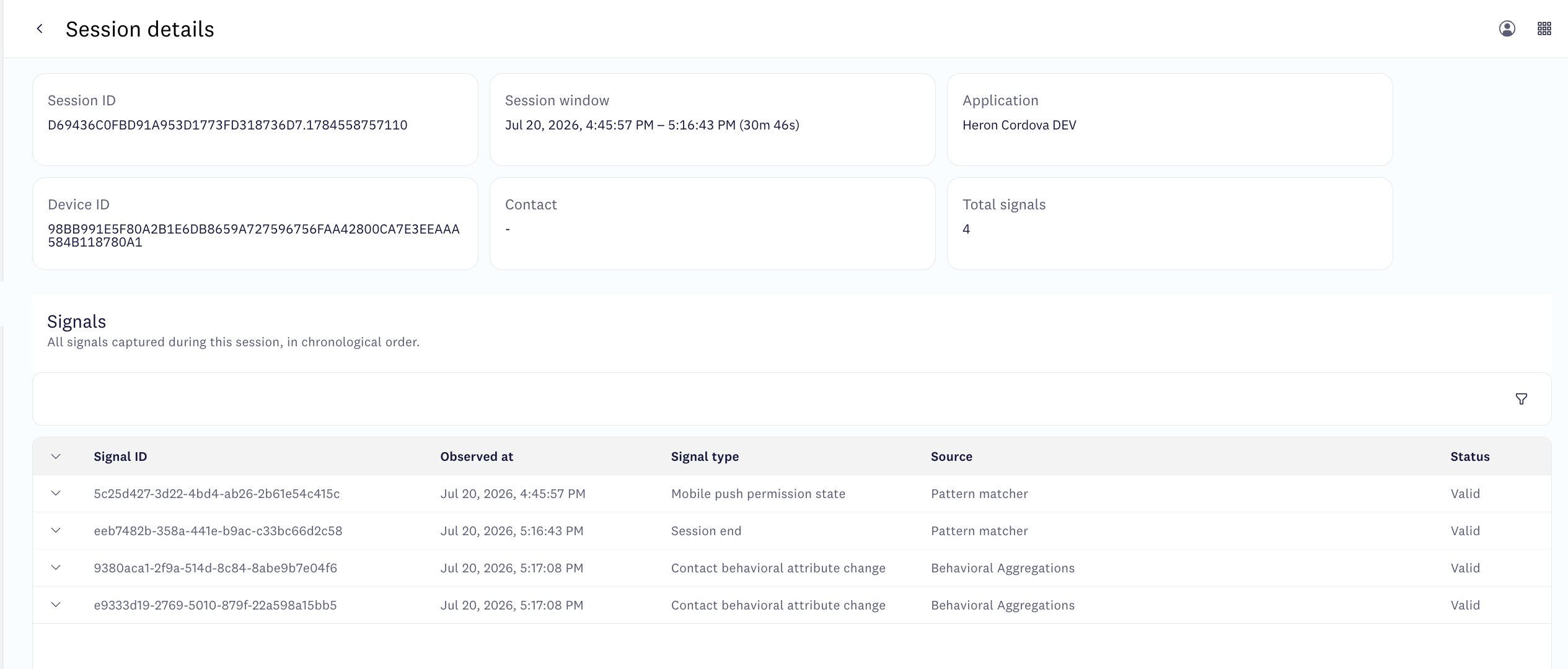
On Premium and Ultimate plans, you can also confirm the session in Connect: go to Behavior analytics > Session intelligence and look for your test session.
Troubleshooting
pod install / npx cordova build ios fails: command not found: pod
pod install / npx cordova build ios fails: command not found: podCocoaPods isn't installed. Run sudo gem install cocoapods && pod repo update. On Apple Silicon, an outdated ffi gem can also break pod install — if gem install cocoapods itself fails, try sudo gem install ffi.
Undefined symbols / "Framework not found Pods_App" at build time
You opened platforms/ios/App.xcodeproj instead of the CocoaPods-generated workspace. Always open platforms/ios/App.xcworkspace after npx cordova prepare ios / npx cordova build ios.
CocoaPods platform-compatibility error naming AcousticConnect / AcousticConnectDebug
AcousticConnect / AcousticConnectDebugYour project's deployment-target is below the plugin's minimum of 15.1. Remove any config.xml override below 15.1, or raise it to at least 15.1.
CocoaPods LD_RUNPATH_SEARCH_PATHS override warnings
LD_RUNPATH_SEARCH_PATHS override warningsnpx cordova prepare may produce warnings like:
[!] The `App [Debug]` target overrides the `LD_RUNPATH_SEARCH_PATHS` build setting defined in `Pods-App.debug.xcconfig`. This can lead to problems with the CocoaPods installation.cordova-ios generates project.pbxproj with a hardcoded LD_RUNPATH_SEARCH_PATHS value that doesn't include $(inherited), so CocoaPods' xcconfig paths are silently overridden. Any manual fix in Xcode Build Settings is overwritten on the next npx cordova prepare. Apply the fix via an after_prepare hook instead so it persists across prepares:
module.exports = function (context) {
  const platforms = context.opts.platforms;
  if (platforms.length > 0 && !platforms.includes('ios')) return;

  const path = require('path');
  const fs   = require('fs');

  const pbxprojPath = path.join(
    context.opts.projectRoot,
    'platforms', 'ios', '<YourApp>.xcodeproj', 'project.pbxproj'
  );
  if (!fs.existsSync(pbxprojPath)) return;

  let src = fs.readFileSync(pbxprojPath, 'utf8');
  const PATTERN     = /LD_RUNPATH_SEARCH_PATHS = "(?!\$\(inherited\))([^"]+)";/g;
  const REPLACEMENT = 'LD_RUNPATH_SEARCH_PATHS = "$(inherited) $1";';
  if (!PATTERN.test(src)) return;

  PATTERN.lastIndex = 0;
  fs.writeFileSync(pbxprojPath, src.replace(PATTERN, REPLACEMENT), 'utf8');
};
Register it in config.xml under the iOS platform block:
<platform name="ios">
  <hook type="after_prepare" src="hooks/after_prepare_ld_runpath.js" />
</platform>
The hook patches the pbxproj on the first prepare and skips cleanly on subsequent runs.
"Unsupported Swift Version" dialog on opening the workspace
After running npx cordova prepare ios and opening the .xcworkspace, Xcode may present an "Unsupported Swift Version" dialog for the Connect plugin. This happens because cordova-ios doesn't set SWIFT_VERSION in the generated project.
Dismiss the dialog, then set the version manually: select the project in the Xcode navigator, go to Build Settings, search for Swift Language Version, and set it to Swift 5.
ConnectConfig.json not found
ConnectConfig.json not foundnpx cordova prepare fails with this error until you add ConnectConfig.json at your Cordova project root — the plugin doesn't generate it for you. See Initial setup, step 2.
SDK initializes but no session appears in Connect
Two common causes:
- Collector mismatch.
PostMessageUrlpoints to a different collector node than the one where your app is registered. Verify the app key and collector URL in your Connect account, update ConnectConfig.json, and rebuild. - App closed before flush. The SDK flushes session data when the app goes to background. If the app or emulator is closed immediately, the flush may not complete. Put the app in the background and wait a few seconds before closing.
Next steps
- Identify users at sign-in — send the logged-in signal to attribute sessions to known contacts.
- Identify users at registration — send the account-registered signal.
- Enable push notifications (iOS) and Enable push notifications (Android).
Updated 3 months ago